1) You just set up a "new" computer and the default is "normally" to send all email as HTML. The server rejects these, but doesn't bother to notify you, so you simply don't get through. The remedy is to go into your "tools", "options", and "send" (in Outlook or other "email client") and change your "mail sending format" to "plain text". That'll fix it.
2) You just set up a "new computer" and you incorrectly typed your email address in the "reply to" field while setting up your email. This will lead to all kind of problems, but you won't be able to post because your reply-to address doesn't match the address from which you're subscribed, so it fails. Best policy is to leave the "reply to" field blank. The only folks that need that are spammers or others who don't want you to know how to reply to their messages.
3) You're trying to post from work or some other email account from which you are not subscribed. The list should inform you that you are not a member of the list, and that should be your first clue. Some people get irrate, convinced that their God-given right to post has been revoked by the moderator jerk, and I get nasty emails. The easy answer is to join from both accounts (send a message to krnet-join@list.krnet.org from the "excluded" account, and set one of them to receive no posts, so you don't get them twice.
4)One more reason would be if your ISP is stupid like Netzero, and tells you your email address is "somethingorother@somewhere.COM", but your return address is actually "somethingorother@somewhere.NET" instead. Same problem as number 3...your subscribed address needs to match your reply-to address, or it's not gonna work.
5) If you suddenly stop receiving email from the list entirely, and you've done nothing stupid with your email accounts, the first place to look is your ISP's spam filter. That'll kill everything from the list in a heartbeat. It's happened to me, and I'm the list owner.
First off, Yahoo and other "free" email adresses are the number one complainers about their messages from KRnet suddenly stopping. I'm often accused of throwing them off the list, but that's almost never the case (when I throw somebody off (maybe every year or two, you'll get an earful from me first!). Apparently Yahoo and others brand KRnet email as spam, and just kill it before it every leaves there. You'll have to work with them on that, but rarely do I hear of anybody getting this resolved, so my recommendation is simply get a gmail email address. Of course all of your info will now be sucked into the Google cloud, but your provate info is probably there already!
AOL and some other ISPs attempt to control spam through user actions, as well as some automatic controls. Unfortunately, this can create serious complications for those on mailing lists. KRNet suffers from both kinds of actions.
One thing AOL does is if it sees a large number of "undeliverable mail" coming in from a certain domain (such as list.krnet.org), it will decide that it must be spam, rather than private email from individuals, and start blocking that domain. There is no amount of common-sense pleading that will get your domain taken off that list once it is added, so the smart thing to do is not get there in the first place. This is exactly why our old list at mailinglists.com would not deliver mail to AOL subscribers.
The "mailman" software has certain features set up as defaults, including one that will suspend email to a list subscriber if it starts getting "undeliverable mail" messages returned. If it gets a certain number of those within a specific amount of time, it will suspend that email address for a while in order to give the problem a chance to get cleared up. It will send several messages over the period of a week notifying the subscriber that his subscription has been disabled, and that he needs to go to visit http://list.krnet.org/listinfo/krnet
to re-enable his subscription. If the situation persists, the system will automatically unsubscribe the guy, and if that's the case, he may be unsubscribed and will never have gotten the message telling him that he's been thrown off the list. In that case, your first clue is that you haven't gotten email from KRnet for several days. When you figure that out, just go re-subscribe. No biggie. But take the situation as a clue that your ISP (not necessarily AOL) is a little flaky around the edges and has a tendency to go up and down, and occasionally cannot be found to deliver mail to. I've seen 30 AOL users be unsubscribed at the same time due to undeliverable mail problems.
Another problem is the "mail controls" that allow the user to block messages from certain senders. It's all too easy to select a bunch of spam and accidently include a message from another KRNet subscriber. After you do that, every message that the other guy sends to the group will generate a message that looks like:
"Your mail to the following recipients could not be delivered because they are not accepting mail from somebodyoranother@somewhere.com
NETZERO users:
If you are having problems that you can't figure out by yourself, email the list administrator (Mark Langford at krnet-owner@list.krnet.org, but I'd appreciate it if you'd try to fix it yourself first.
Return to www.KRnet.org
Special Instructions for Yahoo, AOL and other email clients
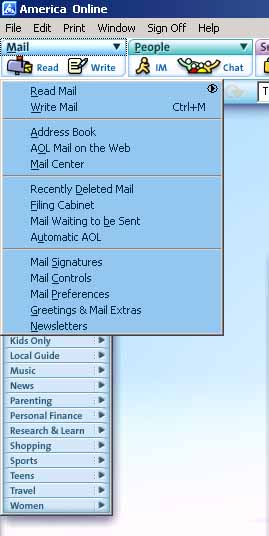
To access AOL's "mail controls", click on the blue "MAIL" header to pop down the menu shown here, and choose "MAIL CONTROLS". The following box will appear. Next click on "People and Places" to get the screen shown below.
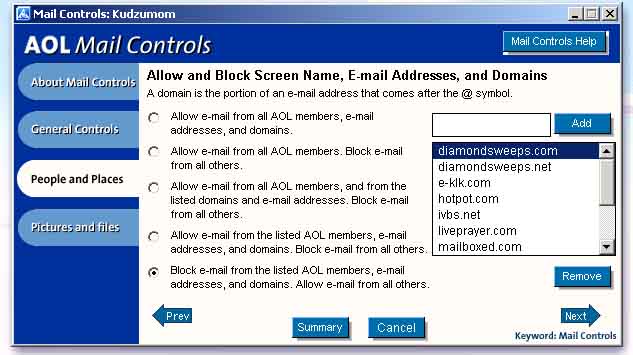
Once here, you can see what choices you've made, and a list is displayed of the people who you've blocked. Simply find the guy that you've blocked, and remove his name from the list, and don't let it happen again!!!
I've had several requests over the last few months to fix problems with people who have accounts with "netzero" domain names (starting with the infamous "JoSandt" character). What happens is that they sign up using their email address of somethingorother@netzero.com, but get a message like "sorry, but you have to be a member of the list to post to it". That's because netzero puts your RETURN address in as somethingorother@netzero.NET , and those are two different people as far as the rest of the world is concerned. The cure is that you have to subscribe from BOTH email accounts, and then go into your account (at http://list.krnet.org/listinfo/krnet and disable the mail from one of them (I guess the .com one would make sense) so you don't get two copies of every message. You need to know your password, which was in the "welcome to the list" message that you got on day one, or you can get a reminder at the bottom of that same link (which is also printed at the bottom of every message that goes to the lists).